Scanners Tab
The Scanners tab in 1LYOptions is designed to help traders quickly identify opportunities in the market by automatically scanning for patterns, technical indicators, and price action signals.
It reduces manual effort by highlighting stocks or indices that match predefined conditions, allowing you to analyze and trade directly from the results.
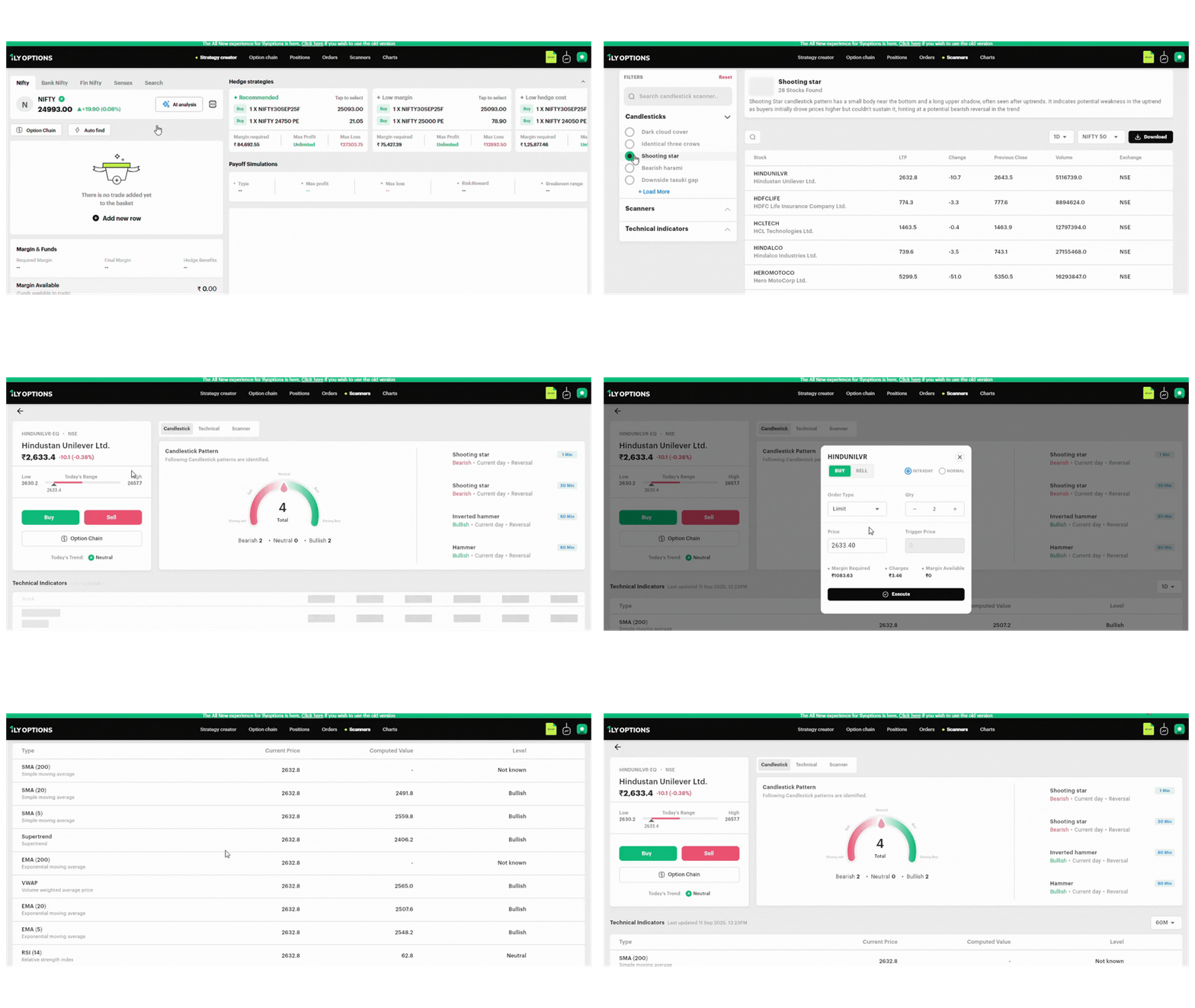
1. Accessing the Scanner
- From the top menu bar, click on Scanners.
- The screen opens with a filter panel on the left and a results area on the right.
2. Selecting a Scanner
The left panel contains different categories of scanners:
- Candlestick Patterns (e.g., Shooting Star, Doji, Engulfing).
- Scanners (Price/Volume based) (e.g., NR7, Range Breakouts, 52-Week High/Low, Volume Shockers).
- Technical Indicators (e.g., SMA, EMA, VWAP, RSI, Supertrend, Bollinger Bands).
- Search: Use the search bar to quickly find a scanner.
- Select a Pattern: Click on a scanner (e.g., Shooting Star).
3. Viewing Scanner Results
Once a scanner is selected:
- Scanner Description: Displays the meaning of the pattern (e.g., Shooting Star indicates a bearish reversal after an uptrend).
- Results Table: Shows all instruments that match, with:
- Stock/Index Name
- LTP (Last Traded Price)
- Change from previous close
- Previous Close
- Volume
- Exchange
- Filters for Results:
- Timeframe Selector: 1 Day, 60 Min, 30 Min, 15 Min, 5 Min.
- Market Selector: NIFTY 50, NIFTY 100, NIFTY 200, NIFTY 500, F&O.
- Download Button: Export the entire list in Excel for offline analysis.
Example: Shooting Star (1D, NIFTY 50) → 26 results including Hindustan Unilever, HDFC Life, HCL Tech, Hindalco.
4. Clicking on a Stock
When you click on a stock (e.g., Hindustan Unilever Ltd), a detailed Script Analysis Page opens with three tabs:
A. Candlestick Tab
- Displays detected candlestick patterns with timeframes (1 Min, 30 Min, 60 Min, 1 Day).
- Gauge showing total signals (e.g., 4 = 2 Bearish, 2 Bullish).
- Pattern list with details like Shooting Star (Bearish – 30 Min) or Hammer (Bullish – 60 Min).
B. Technical Tab
- Displays CPR Levels (Central Pivot Range) with Support (S1–S3) and Resistance (R1–R3).
- Indicates Band Range (Narrow/Broad) and CPR Trend (Trending/Sideways).
- Helps identify strong support/resistance zones.
C. Scanner Tab
- Displays if the stock itself matched other scanners.
- If no data is available, the screen shows “No Data Available”.
5. Placing a Trade
From the Script Analysis Page:
- Buy / Sell Buttons: Place direct orders.
- Option Chain Button: Switch to derivatives view for options trading.
Order Window (on click Buy/Sell):
- Select Order Type: Market, Limit, Stop Loss.
- Enter Quantity (lots).
- Select Product Type: Intraday (MIS) or Normal (NRML).
- View margin required, brokerage charges, and available margin.
- Click Execute to place the order instantly.
Example: Clicking Buy on Hindustan Unilever opens an order window showing:
- Order Type = Market
- Qty = 1
- Margin Required = ₹554.21
- Charges = ₹1.73
6. Example Workflow
- Click Scanners tab.
- Select Shooting Star pattern.
- Results display 26 stocks matching the criteria.
- Click on Hindustan Unilever Ltd.
- View candlestick patterns (Bearish Shooting Star, Bullish Hammer), Technical CPR levels, and Scanner data.
- Confirm trade bias and click Buy/Sell to place an order directly.