Positions Tab
The Positions tab in 1LYOptions allows you to monitor and manage all your open and executed trades in real time. It combines analytics, P&L tracking, and risk-reward insights to help traders stay on top of their strategies.
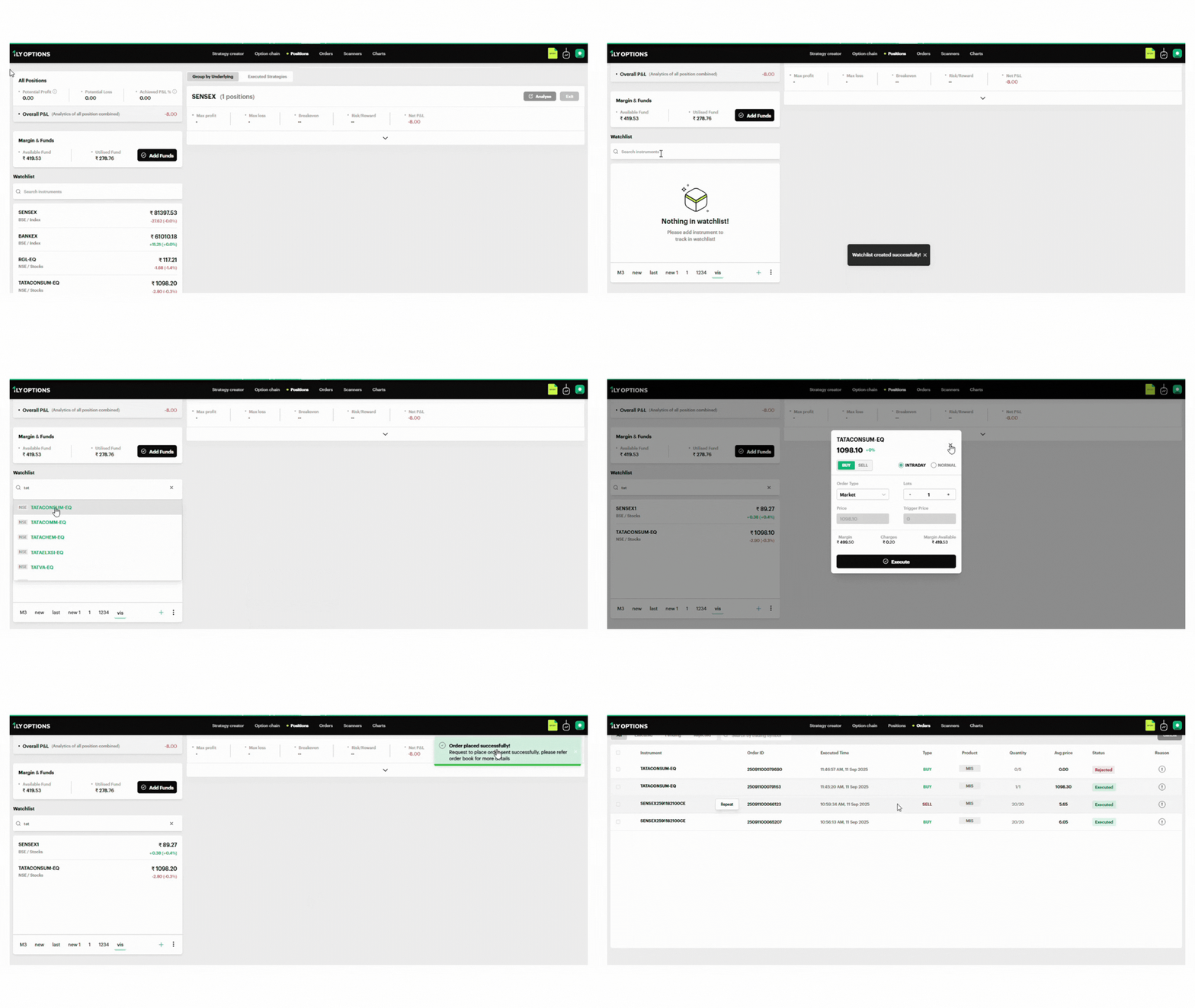
All Positions Overview
At the top, you’ll see a summary of all active trades:
- Potential Profit: The maximum profit you can earn from all open positions.
- Potential Loss: The maximum risk associated with your open trades.
- Achieved P&L %: Current realized profit or loss as a percentage.
- Overall P&L: Combined profit/loss across all positions.
— This gives you a quick health check of your trading portfolio.
Margin & Funds Section
Displays your fund utilization in real time:
- Available Fund: Free margin available for new trades.
- Utilised Fund: Margin currently blocked for open trades.
- Add Funds Button: Redirects you to the ANT platform to quickly transfer funds into your trading account. Click here to know more about how to add Funds.
Watchlist
The Watchlist in 1LYOptions allows you to quickly monitor your preferred instruments (indices, stocks, or options). It is located on the left-hand panel of the screen for easy access.
Key Features
Search & Add Instruments
- Use the search bar to find and add instruments such as indices, stocks, or options contracts.
- Example: Typing “vi” shows instruments like India VIX.
Create New Watchlists
- Click the “+” button at the bottom to create a new watchlist.
- You can maintain multiple watchlists (e.g., “Nifty 50 Stocks”, “Bank Nifty Weekly”, “F&O Strategies”).
Manage Watchlists (3-dot menu)
- Clear Watchlist: Removes all instruments from the current list.
- Rename Watchlist: Helps you organize by giving meaningful names.
- Delete Watchlist: Permanently removes the selected watchlist.
Real-Time Price Updates
- Instruments in the watchlist update live.
- Green highlight = price gain; Red highlight = price loss.
Example:
A user creates a watchlist named Indices, which includes:
- SENSEX
- BANKEX
- RGL-EQ
- TATACONSUM-EQ
- INDIA VIX
This setup helps the trader monitor both broad indices and key stocks simultaneously.
(You can create multiple watchlists (e.g., New, Latest, Final) for better organization.)
Group by Underlying / Executed Strategies
You can view positions in two ways:
Group by Underlying
- Shows your positions grouped by instruments (e.g., NIFTY, BANKNIFTY, SENSEX).
- Example: SENSEX (1 position) → Net P&L: -8.00.
Executed Strategies
- Displays trades based on the strategies you have created or executed, making it easier to analyze performance strategy-wise.
Each group displays:
- Max Profit / Max Loss
- Breakeven Points
- Risk/Reward Ratio
- Net P&L
You can also click Analyse to simulate and visualize payoff diagrams for deeper insights, or use Exit to close the position.