Option Chain
The Option Chain in 1LYOptions provides a real-time view of all available option contracts for an index or stock. It is one of the most important tools for options traders to analyze strike prices, premiums, open interest, and implied volatility before making trading decisions.
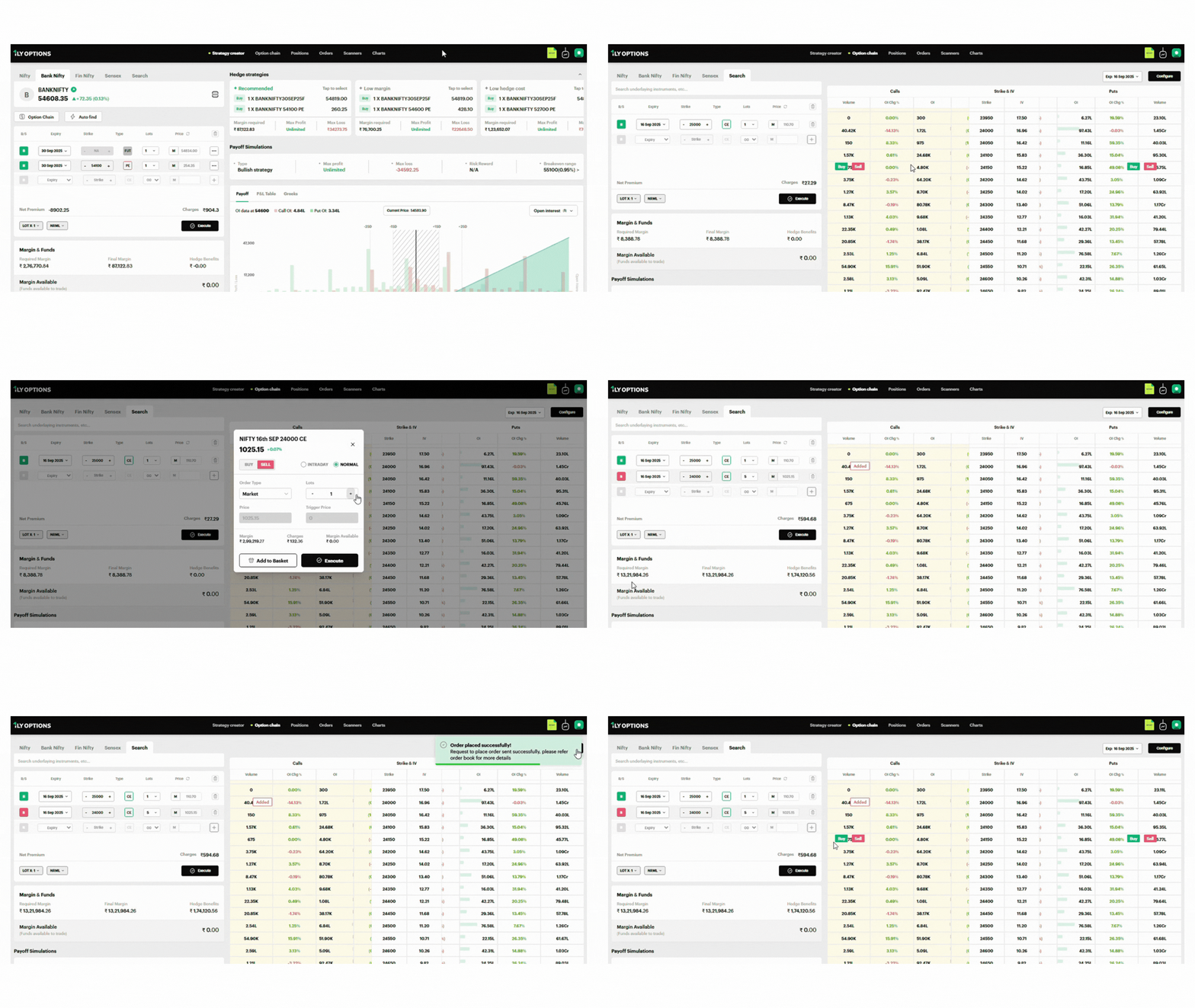
Key Elements on the Option Chain Screen
Instrument Selection (Top Bar)
- Choose the instrument you want to analyze: Nifty, Bank Nifty, Fin Nifty, Sensex, or search for others.
- Example: Here, Nifty 50 is selected with the current spot price displayed at the top (24,986.35).
Order Entry Panel (Left Side)
- B/S (Buy/Sell): Select whether to buy or sell an option.
- Expiry: Choose the contract expiry date (e.g., 16 Sep 2025).
- Strike Price: Select the strike level (e.g., 25,000 CE).
- Type: Choose CE (Call) or PE (Put).
- Lots: Adjust the lot size.
- Price: Enter limit/market price.
- Execute Button: Place the order directly.
Additional options include:
- Order Type: NRML or MIS.
- Lot Multiplier: Quickly scale orders (Lot ×1, ×2, etc.).
Margin & Funds Section (Bottom Left)
- Required Margin: Total margin needed for the trade.
- Final Margin: Adjusted margin after hedge benefits.
- Hedge Benefits: Margin reduction from hedged positions.
- Margin Available: Funds available in your account.
Payoff Simulations are also available to visualize P&L impact of your trades.
Option Chain Table (Right Side)
Displays Calls (left) and Puts (right) side by side with the strike prices in the middle. Key columns include:
- Volume: Number of contracts traded.
- OI (Open Interest): Outstanding contracts at each strike.
- OI Chg %: Percentage change in open interest (helps identify buildup or unwinding).
- IV (Implied Volatility): Market’s expectation of volatility for that strike.
- Premiums: Price of the option contract.
- Bid/Ask Spread: Best buy/sell offers for contracts (hidden inside order panel).
Example: At the 24,000 strike, the Put OI rose 60.33%, indicating strong support buildup.
Expiry Selector & Configuration (Top Right)
- Switch between different expiries.
- Customize the Option Chain view (strike range, display columns, etc.).
Placing an Order from the Option Chain
The Option Chain in 1LYOptions is directly integrated with the order placement window. This allows you to analyze contracts and place trades instantly without leaving the screen.
Steps to Place an Order
1. Select the Instrument
From the top navigation of the Option Chain, choose your instrument: Nifty, Bank Nifty, Fin Nifty, or Sensex.
2. Choose a Contract
In the Option Chain table, click on the strike price (Call or Put) you want to trade.
Example: NIFTY 16th SEP 24650 CE.
3. Order Window Opens
The pop-up displays:
- Current Price of the selected option (e.g., ₹390.05).
- % Change from the previous day.
- BUY / SELL toggle to choose direction.
- INTRADAY or NORMAL to select product type.
4. Set Order Details
- Order Type: Market or Limit.
- Lots: Enter the quantity (number of lots).
- Price & Trigger Price: Auto-filled for market orders, editable for limit orders.
- Margin Required: Total funds needed.
- Charges: Brokerage and fees.
- Margin Available: Your available balance.
5. Place or Queue the Order
- Add to Basket → For multi-leg strategies.
- Execute → To place the order immediately.
Example Workflow
You want to Buy 1 lot of NIFTY 24650 CE expiring on 16th Sep.
- Select the strike in the Option Chain → Pop-up window opens → Choose BUY, NORMAL, Market Order, 1 Lot → Review Margin & Charges → Click Execute.
The order will now move to the Orders tab for confirmation and tracking.